Be yourself; Everyone else is already taken.
— Oscar Wilde.
This is the first post on my new blog. I’m just getting this new blog going, so stay tuned for more. Subscribe below to get notified when I post new updates.
Be yourself; Everyone else is already taken.
— Oscar Wilde.
This is the first post on my new blog. I’m just getting this new blog going, so stay tuned for more. Subscribe below to get notified when I post new updates.
the purpose of a server is to manage data , control users and to back and print.
when caring for the server rack we had to clean the actual rack and the servers of dust and we had to set up the servers by
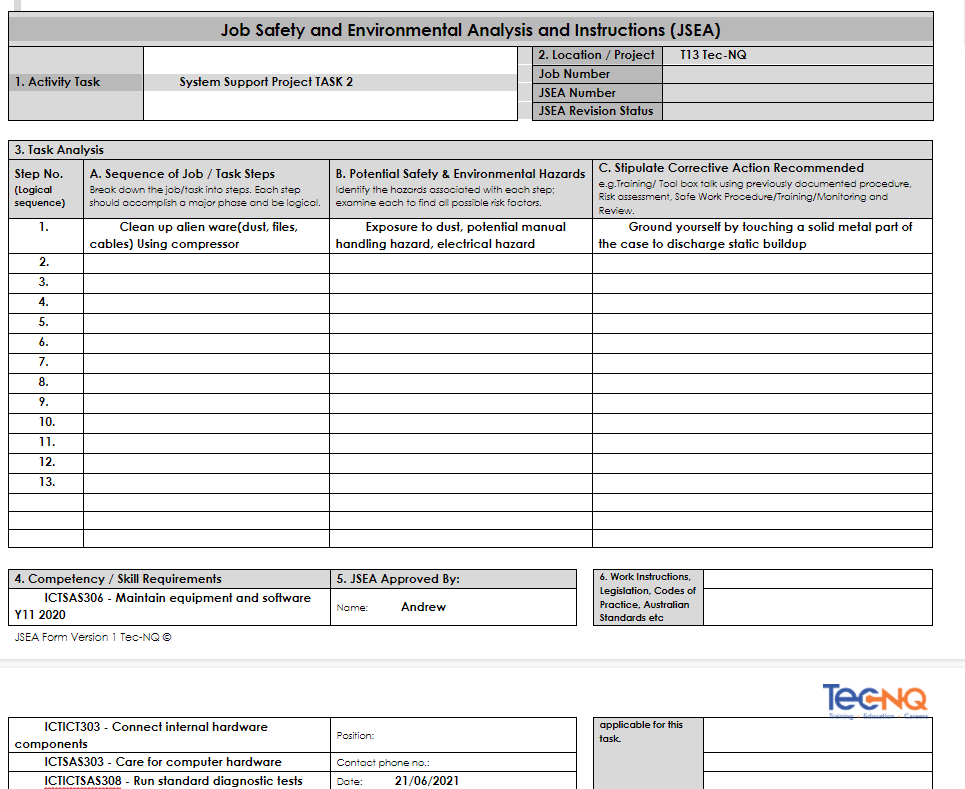
Some risks and hazards include electrical hazards of cable management so if you fray your wire and it touches a conductive mental you could electrocute your self. Dust is also another factor as it can get in your eyes and lungs. If you keep the server clean and maintain it, the components lasts longer and reduces the impact on the environment due to components lasting longer.
Before the server drives were formatted, we configured the drives using the raid configuration BIOS for raid 1.RAID 1 consists of an exact copy (or mirror) of a set of data on two or more disks; a classic RAID 1 mirrored pair contains two disks. this is useful as it will use the second disk if you have broken the first one. Community Enterprise Operating System is a free, open source Linux distribution. CentOS is functionally compatible with Red Hat Enterprise Linux (RHEL). And it’s derived from RHEL
Then we tested the installation by turning it on, then checking if fans run normally ie no over-heating. Then we test it out we could add users and test their permissions by creating files they should and shouldn’t have access to. (What other tests?)
We documented the process on a word document.
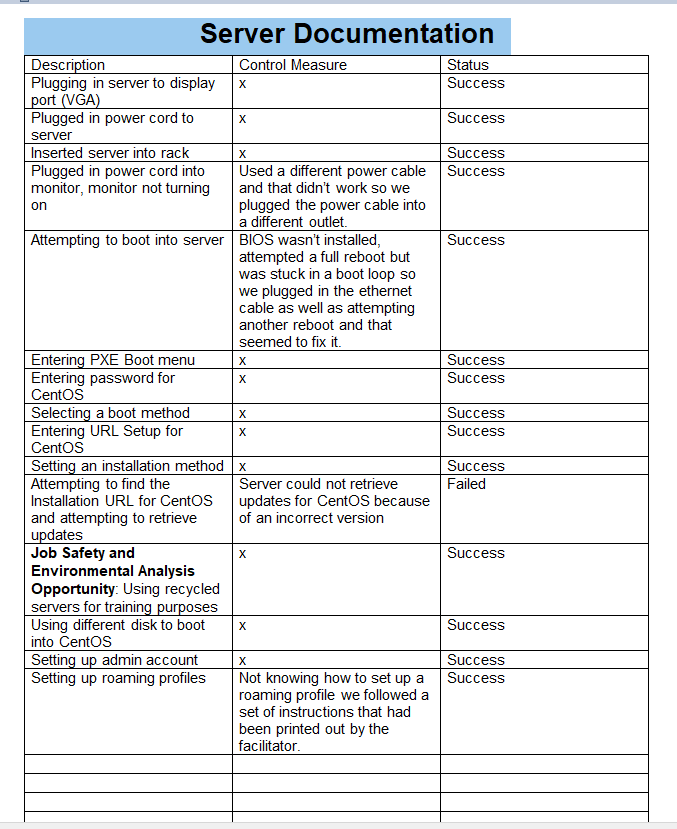
Some of the issues were that the system wouldn’t accept the version of OS due to it being out-dated and not supported anymore. we used the 2017 version

when you care for a server and the rack its in you need to routinely check on it. wipe it down or dust it and you would need to scan the hard drives and check the logs. To document this project we wrote the steps or method down on paper and converted it to a word document . The risks and hazards of cleaning the server as according to the WHS are trip hazards manual handling electrical hazards and sharp materials .This also applies to the environment as it has the chance of causing dust/air pollution .
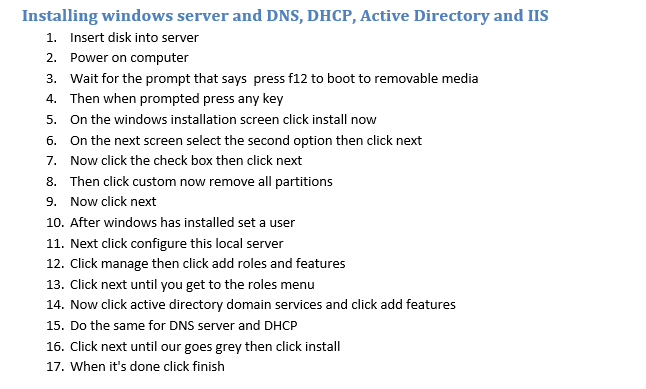
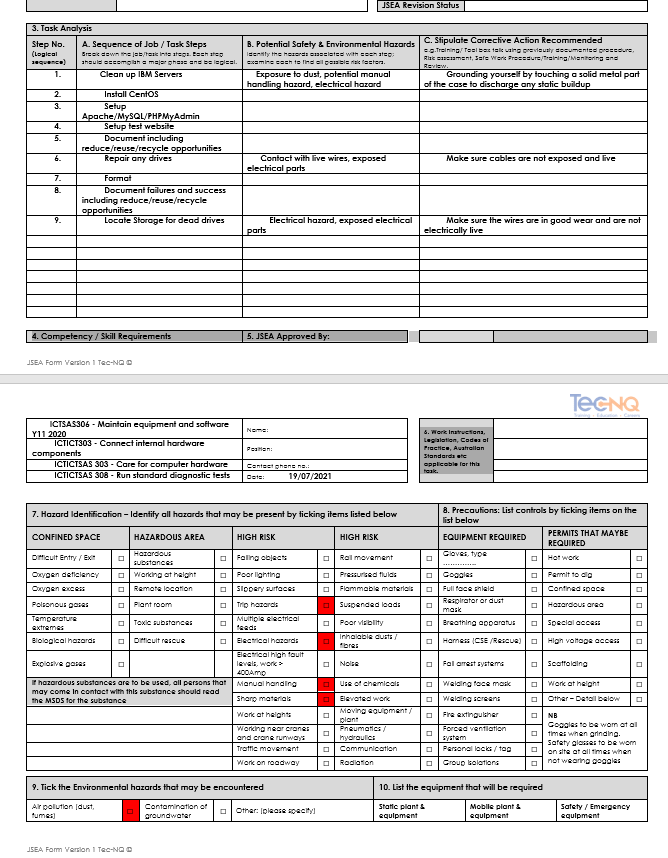
To install the server we grabbed the hard drives and started to format the server we formatted two of the drives then verified them after that we set up raid 1 mirror and then ran the installer disk. To test the drives we had to do a verification . We documented this by creating a word document with what we did on it.
To keep the server running smoothly we would need to clean it regularly and verify the hard drives. Once this is done you should start to test it.
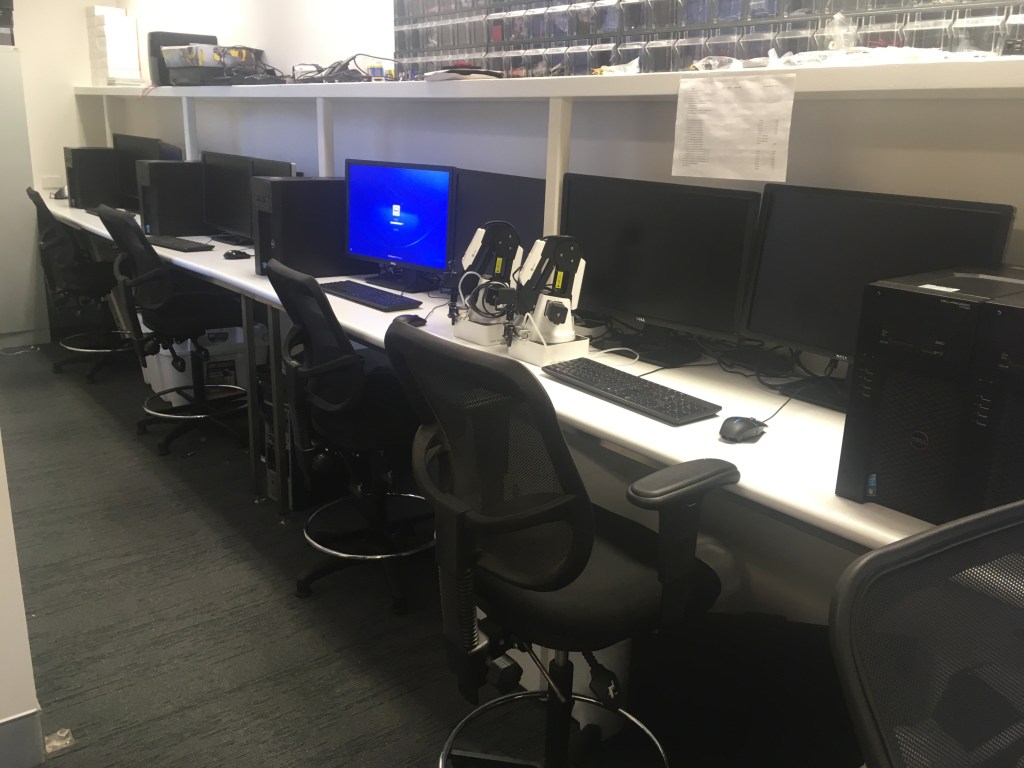
For task one we where designated an assignment to clean the t1700s.To do this we had to fill out a JSEA which is used to consult peers and your boss about the existence of hazards, the risk and how those risks will be reduced. This also documents the process as evidence that consultation and communication of WHS issues has taken place as required by law. The computers are opened up and cleaned out via compressed air. To ensure parts are not damaged we continued with extreme caution and held the fans in place. The reason why computers are cleaned for dust is because dust can effect the pcs performance if it builds up too much. Once that was done we where assigned to ghost the machines and then install windows 7 to the 1700s. We then designed a shared file to do this you create a file on one of your drives, right click the new file you created you click share to others then type in who you want or just their username and then click share and they have to join it by pressing windows r //computer name/filename. To be used by only a certain select people with access after that we added the online game to the folder their where some issues but Riley managed to fix them by Firstly testing online games on the drive. whence launching it from the computer he connected to the server, it came up with an error saying it was missing .dll file. He installed the dll file and moved it onto his computer. Upon relaunching the game it came up with a new error saying, “The application was unable to launch, reinstalling may fix it (x0900007b)”. Upon searching this error up, riley found out that this is a common error and reinstalling the game doesn’t actually fix it. The pc he connected had recently been reformatted as so it was missing some Java files, DirectX files and Microsoft files. After reinstalling these files he tried relaunching the game. The game launched perfectly but came up with an error saying it couldn’t find the filesyscheck file. Upon finding the file himself and placing it in the game folder he relaunched the game and it was a success. The game launched with no errors , the dobot software was installed it was launched and no errors where brought to our attention along with the scanner we tested it by controlling them and using the scanner, this was tested on multiple users.
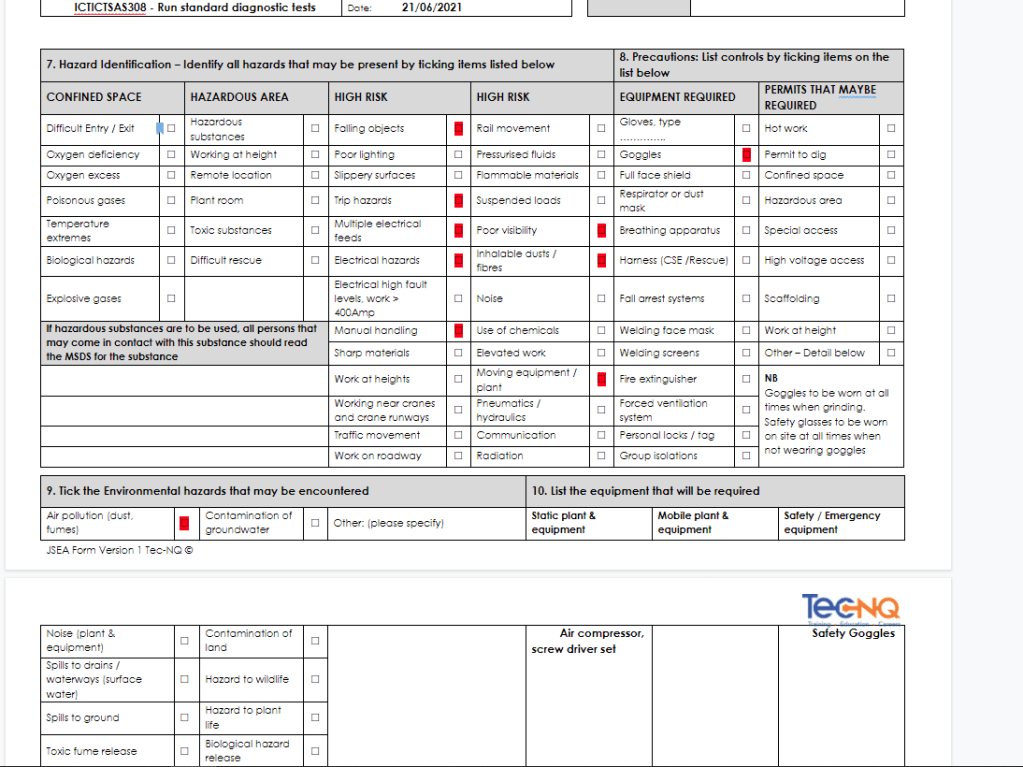
We have backed up the following things we have backed up the operating system we have backed up the harddrive we have also done an incremental.I have used the operating system called windows10 whilst i have also used linex raspbian when i was at tecnq. The printers security procedure is for you to use your student attainable access key card to swipe two times in the slot.You should have 3 copy on two media and one off site they should nightly back up of whats changed a weekly of a full back up and a monthly for the off site. The details should be written in a log or file to be revised. The back ups are stored in the 321 process for the safety of it .We have used task scheduler word and the raspberry pi application Putty.Employees, students, honoraries, visiting staff or students, or contractors found to be engaging in the unauthorised copying of software will be liable to disciplinary or legal action.The main ict systems i have used at any of the work places i have been to has mostly always been windows 10 but i have been on a work placement with apple computers and there OS which was in tiredly different.
the purpose of making models is to use them in games as players or props
requirements
3ds max
chrome
Components used
Boxes and mesh editor.
To store data of board games such as games and pieces.
Reqiurements
Steps
Problems
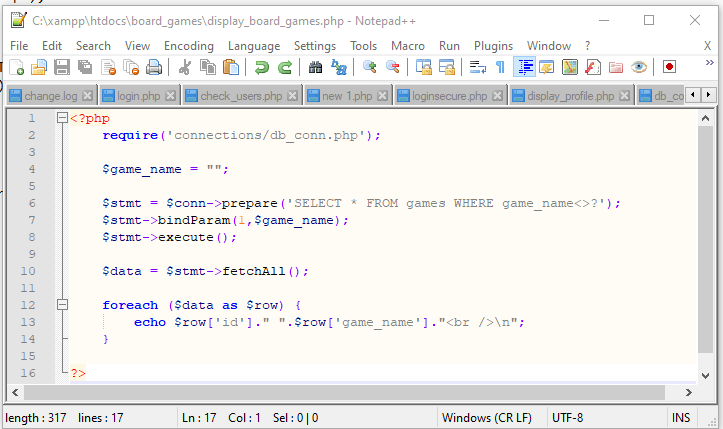
First problem was the data base name was incorrect
I had to open db_conn.php that was in the connections folder and change the name of the database.
Testing
I used Chrome and opened up the first script called display_board_games.php
I used Chrome and opened up the first script called display_pieces.php
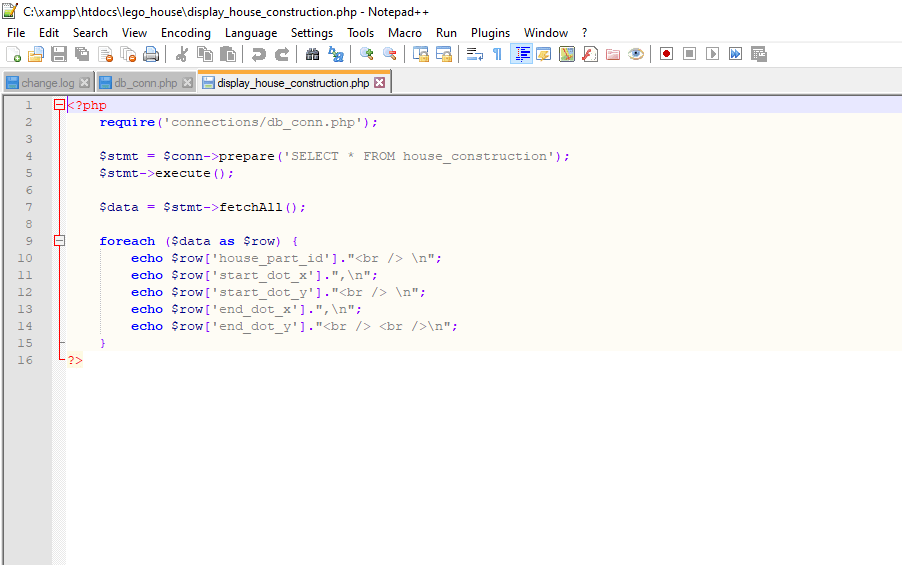
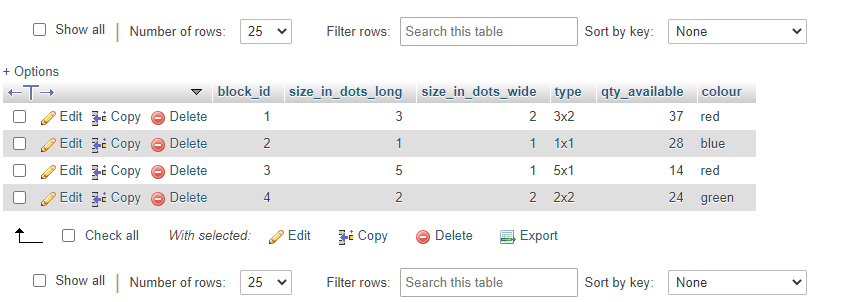
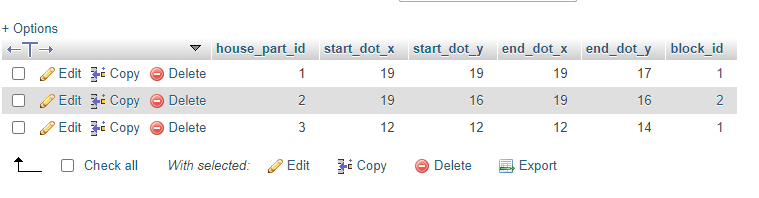
the purpose is to create a database to store the level and height of a block and the stats and measurements of the contruction.
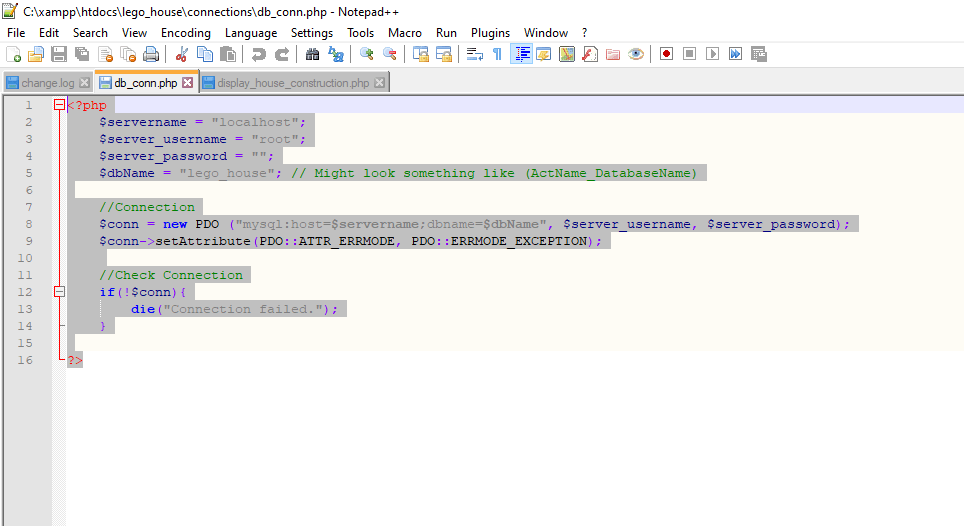
to do this we required software, the software we used was xampp and notepad++
BLOCKS(block_id, size_in_dots_long, size_in_dots_wide, type, qty_available, colour)
HOUSE_CONSTRUCTION(house_part_id, start_dot_x, start_dot_y, end_dot_x, end_dot_y, block_id)
and a php script called display_house_construction.php where used as components
create a package to reuse in multiple games to provide authentication facility’s
steps to install 2019.4.2
go online to install the unity installer and unity hub installer
then open the instalment app and start the process for both of the programs
finish the installers then open the programs to test it.
problems i had with the instalment and the url is not knowing what each part means.
the purpose of the database server is to store an application of multiple users, using php to maintain the data.
the requirements
-xampp v3.24
MySQL Server version: 10.1.30-MariaDB- mariadb.org binary distribution
-PHP version : 7.2.1
-Chrome version 83.0.4103.116 (Official Build) (64-bit)
steps
Problems/solutions:
testing/ quality

 Austyn Steve Kelly